
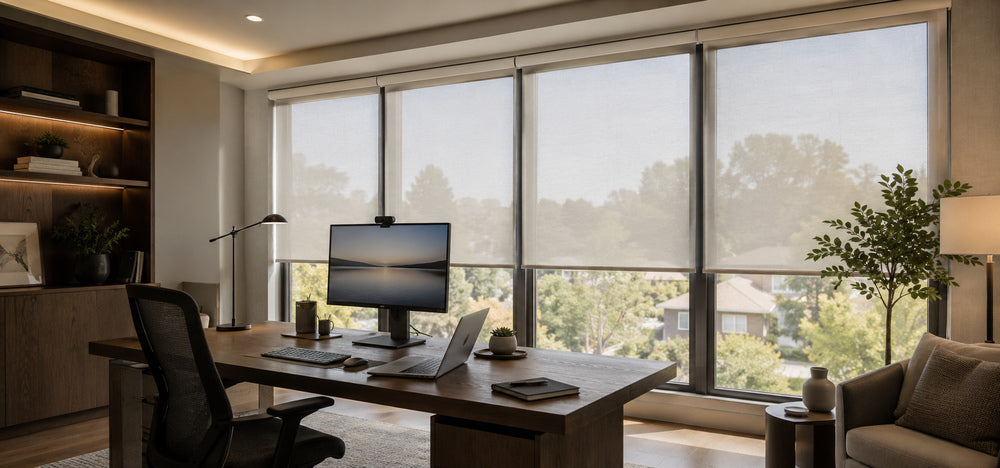

If you've been working from home for a while, you've probably noticed how much the window matters.
Morning sun comes in at an angle and your screen turns into a glare strip — you tilt your head just to read the text. You're mid–video call and a client says your face is hard to see, while the window behind you looks like a stage light.
By afternoon, the west-facing sun is hitting the keyboard directly, and just sitting at the desk feels warm. Evening rolls in and the room suddenly feels dim, so you reach for the desk lamp to make it through the rest of the day.
A lot of this comes down to window treatments. The right setup for a home office handles the changing light through the day, and keeps the long-haul workday more comfortable.
Below, a few directions worth considering for home offices, along with the SmartWings options that fit each one.

What a Home Office Needs From Its Window Treatments
A home office is different from a bedroom or living room. You spend most of your waking hours here, and the light directly affects your focus, eye strain, and the first impression you make on video.
Specifically, home office light needs come down to a few things:
Reducing screen glare — direct sunlight on the screen makes text hard to read and tires the eyes over long workdays
Balancing video call lighting — too much backlight overexposes the face, too little front light leaves it shadowed
Sustained visual comfort — even, soft light keeps the body steady through a full workday
Privacy during work hours — WFH means windows are exposed to the outside for long stretches
Adapting to a changing day — morning, afternoon, and evening each call for different light
The sections below cover the main directions that handle these needs well.
Zebra Shades: Flexible Daytime Light Control
If your home office sees the most use during daylight hours, Zebra Shades are worth considering first. Alternating sheer and opaque stripes slide into or out of alignment as the shade moves, giving you smooth control over how much light comes through.
What that looks like in a home office:
Mornings, softer light — sheer stripes open, even daylight comes into the room
Afternoons, stronger sun — opaque stripes block direct rays, and screen glare drops noticeably
During a video call — quick adjust to a soft, balanced light so your face reads well on camera
Evening transition — slide the stripes back open as the room shifts to lamp-light mode
SmartWings Zebra Shades lean modern in style, which pairs well with the minimal, Scandinavian feel of many home offices.

Light Filtering Roller / Cellular: Glare Control That Lasts All Day
If your office window faces direct sun — especially south or west exposure — Light Filtering Roller Shades or Light Filtering Cellular Shades are the more direct fix.
Light Filtering Roller Shades use a semi-translucent fabric that softens direct sunlight. Screen reflections lighten up, and the eyes feel less strained over long workdays.
The fabric selection runs from solids to subtle textures, so it adapts to most office styles. For more on roller types, see the 12 types of roller blinds guide.
Light Filtering Cellular Shades add insulation on top of soft light — sitting next to the window feels warmer in winter and cooler in summer.
If your office desk is right by a window with strong temperature swings, cellular is the more stable choice across seasons. For details, see the honeycomb shades buying guide.

Blackout Options: For Recording, Demos, and Late Work
Not every home office needs blackout, but it earns its place in a few scenarios:
Recording video or going live — full light control means no surprises on camera
Product demos or screen presentations — deep darkening keeps screen content sharp
Important meetings that need full focus — outside distractions stay outside
Late-night work — streetlights and neighboring windows don't leak in
SmartWings Blackout Roller Shades and Blackout Cellular Shades both support motorized control, with the option to preset a "deep darkening mode" for one-tap access.
If your home office doubles as a media setup, blackout is worth the investment. For pairing ideas, see the bedroom blackout blinds guide.

Smart Control: Light That Follows Your Workday
A home office is one of the spaces where smart shades show their value clearly. The light needs change all day, and you're rarely free to manually adjust on the fly.
A few of the most useful setups:
Scheduled routines — shades soften to a working light at 9 a.m., partially close during peak afternoon sun, and rise at 6 p.m. as you shift to lamp-light.
Scene presets — a "video call mode" for balanced facial light, a "presentation mode" for deep darkening, a "focus mode" tuned for the lowest screen glare.
Voice control — adjust shades without breaking out of work flow, no need to leave your seat.
SmartWings motorized shades are compatible with Apple Home, Google Home, Amazon Alexa, and Z-Wave smart home systems.
For more on smart home setup, see the motorized window blinds smart home guide. Apple Home users can also check the Apple Home buying guide.
How to Choose the Right Shade for Your Home Office
Before picking a shade, a few quick questions help narrow things down.
Window orientation shapes the direction:
East-facing (strong morning light) → Light Filtering Roller / Cellular
South-facing (strong all-day light) → Zebra + Cellular pairing
West-facing (afternoon sun) → Cellular for both glare and warmth control
North-facing (gentler light) → any Light Filtering option fits
Interior style:
Modern minimal → Zebra or solid-color Roller
Warm, layered office → Woven Wood or Cellular
Scandinavian → lighter-tone Light Filtering Roller
Smart home ecosystem:
Apple Home / Google Home users → Matter over Thread motor
Z-Wave users → Z-Wave motor
You can find shades that fit your home office on the SmartWings website. For a broader look at selection thinking, the best smart blinds 2026 buying guide is a useful next read.
If you have any questions during the selection process, reaching out to the SmartWings team is always an option.
FAQ About Smart Shades for Home Office
Q1: Which shades are best for a home office?
If your office sees daytime use, SmartWings Zebra Shades give you smooth light control through the day. If your window faces strong direct sun, Light Filtering Roller or Cellular Shades handle screen glare more directly.
Q2: My video call lighting is always off — how do I fix it?
Strong backlight or weak front light both throw off facial lighting. SmartWings Zebra Shades or Light Filtering Roller Shades can quickly shift to a soft, balanced light — pair it with a scene preset to switch into "video call mode" in one tap.
Q3: Does a home office need blackout shades?
Not always. But if you record video, do screen presentations, or work late at night, SmartWings Blackout Roller or Blackout Cellular Shades earn their place. For everyday WFH, light filtering is usually enough.
Q4: How do I reduce afternoon glare on my screen?
Light Filtering Roller or Cellular Shades soften direct sun, and screen reflections ease up noticeably. For west-facing windows, SmartWings Cellular Shades also help with the afternoon heat, making the desk feel more comfortable.
Q5: Is smart control actually useful for WFH?
Schedules let the shades follow the day's light on their own; scene presets switch "video call," "presentation," and "focus" modes with a tap; voice control keeps you in the flow. SmartWings motorized shades are compatible with Apple Home, Google Home, and Alexa.
Q6: Should I use inside mount or outside mount in my home office?
Depends on the space. Inside mount looks cleaner and sits flush — a good fit for compact home offices. Outside mount covers more area and darkens more thoroughly, better for setups that need recording or presentation darkening.
Q7: For long workdays, which shade is easiest on the eyes?
Even, soft light with low glare is the key. SmartWings Light Filtering Cellular Shades give you both soft daylight and insulation, keeping the workspace steady for long sessions. Zebra Shades offer the flexibility to shift the light as the day moves.


