
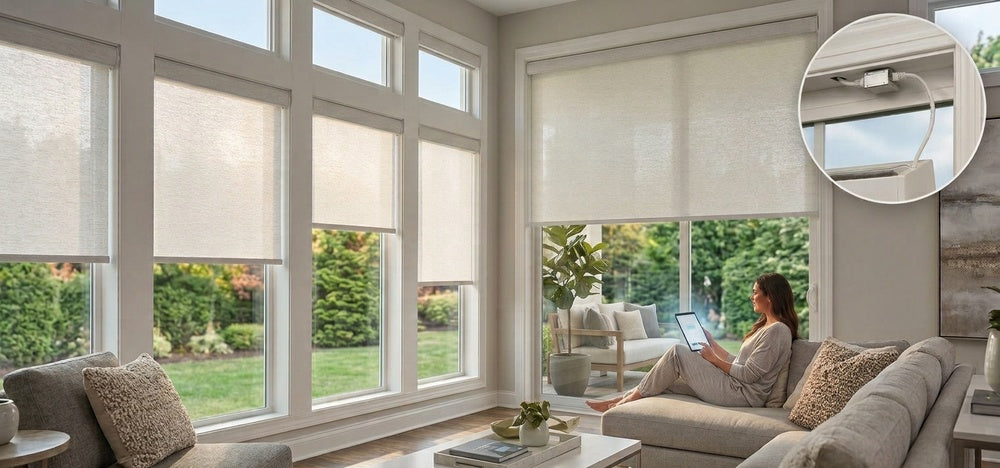

Motorized shades make daily light and privacy control easier. For a whole-home installation, the next question is how to power and connect every window.
A rechargeable motor can be convenient for an existing room. When you are building, remodeling, or planning shades for hard-to-reach windows, a wired connection deserves a closer look.
SmartWings brings these needs together with the world's first PoE Matter over Ethernet motor. One Ethernet cable delivers both power and control data to the shade, combining a wired connection with Matter smart home integration. Here is what that means for your home—and when it makes sense to choose it.
What are PoE Matter motorized shades?
PoE stands for Power over Ethernet. It allows a compatible Ethernet connection to supply electricity as well as carry data.
Matter is the smart home standard that lets compatible devices work with supported platforms. In this motor, Matter communication travels over Ethernet.
Each part has a clear job:
- PoE supplies the motor's power.
- Ethernet provides the wired network connection.
- Matter connects the shade to a compatible smart home platform.
The result is a shade that receives power and network commands through the same cable. It needs no battery charging or separate power outlet at the window.
Learn more about the SmartWings PoE Matter over Ethernet motor.
Where does a single cable make the biggest difference?
Think about a living room with several tall windows. Reaching each shade for charging becomes part of maintaining the room. With PoE, power comes from a central switch, so there is no recurring charging task at those windows.
The same approach suits a new home where Ethernet runs can be planned before the walls are finished. Your installer can bring a cable to each shade location and route the connections back to the network equipment.
A finished home needs a different assessment. If Ethernet is already available near the windows, PoE may be practical. If running new cable would require extensive wall work, rechargeable shades may be easier to install.
The deciding factor is the cable route. PoE offers the most value when wiring can be included naturally in the project.

How is Matter over Ethernet different from Matter over Thread?
Both use Matter for smart home communication. They differ in how the shade reaches your home network.
SmartWings' Matter over Thread motors communicate through a wireless Thread network. They require a compatible Matter Controller and a Thread Border Router. Some smart home hubs provide both functions.
The PoE Matter over Ethernet motor uses a wired Ethernet connection. It requires a compatible Matter Controller for smart home integration, but the Ethernet shade itself does not require a Thread Border Router.
This gives homeowners a choice between wireless placement and a wired connection at each window. For PoE shades, the control-data path does not depend on wireless coverage at the motor. Network configuration and the controller still matter.
PoE vs Battery-Powered vs Traditional Hardwired Shades
The right power option depends on your home's wiring and how you want to manage your shades over time. Battery-powered shades offer flexible installation. Traditional hardwired shades provide continuous power. PoE combines continuous power and wired Matter communication in one Ethernet cable.
|
Feature |
PoE Matter over Ethernet |
Battery-Powered |
Traditional Hardwired |
|
Power source |
Compatible PoE switch |
Built-in rechargeable battery |
12V DC power supply or supported AC connection |
|
Wiring at the shade |
One Ethernet cable carries power and data |
No permanent power wiring |
Dedicated power wiring |
|
Charging |
No recharging required |
Periodic recharging required |
No recharging required |
|
Smart home connection |
Matter over Ethernet, with a compatible Matter Controller |
Depends on the selected motor and compatible hub |
Depends on the selected motor and compatible hub |
|
Installation planning |
Ethernet routes and PoE switch capacity |
Shade mounting and access for charging |
Power routes, with electrical work as required |
|
Best suited for |
Homes with planned Ethernet wiring and centrally powered shades |
Existing homes where new wiring is impractical |
New construction or renovations with dedicated shade power wiring |
Traditional hardwiring supplies power but does not automatically provide a wired network connection. PoE delivers both through the same Ethernet cable.
Compare our battery-powered shades and traditional hardwired shades to explore the installation options. Available power configurations vary by shade style and motor.

What can you do once the shades are connected?
With a supported Matter setup, your shades can become part of the routines you build in your preferred smart home platform.
A bedroom routine might open the shades at 7 a.m. on weekdays. An evening scene could close the living room shades while adjusting the lights. A home office routine could move a shade to your preferred position before the workday starts.
More advanced triggers, such as room temperature or light levels, depend on the platform and compatible sensors. PoE supplies the wired power and connection. Your smart home system determines which routines are available.
Start with one routine that solves a daily need, then add others as you learn how the room behaves. Our guide to smart shade routines and triggers can help you choose.

What should you plan before installation?
Check these details before ordering:
- Cable routes: Plan an Ethernet run to each shade and allow room for the connection near the mounting location.
- PoE capacity: Confirm compatible ports, power per port, and the switch's total power budget for the planned shades.
- Smart home equipment: Confirm that your chosen platform has a compatible Matter Controller.
- Shade configuration: Check PoE availability for the style and dimensions you want.
A regular Ethernet port does not automatically provide PoE power. Use compatible PoE equipment and follow the wiring guide linked on our product page.
For multiple rooms, involve your installer early. Confirming cable routes and equipment before installation helps avoid changes after the shades arrive.
FAQ About PoE Matter Motorized Shades
Q1: Which shade styles support PoE Matter motors?
SmartWings offers PoE Matter motors for compatible configurations of the following styles: Roller Shades, Zebra Shades, Woven Wood Shades, Outdoor Shades, Dual Shades, Roman Shades, and Standard Cellular Shades. PoE availability depends on the specific model and configuration. Check the product's power options or contact our team before ordering.
Q2: Do PoE shades need to be recharged?
No. The motor receives power through Ethernet while the connected PoE equipment is powered and functioning.
Q3: Do I need a hub or Thread Border Router?
You need a compatible Matter Controller for Matter smart home control. A Thread Border Router is not required for the Ethernet shade itself. Other Thread devices in your home may still need one.
Q4: Can I use Apple Home, Alexa, or Google Home?
Yes, with a compatible Matter Controller for your chosen ecosystem. Available controls, routines, and remote access depend on the platform and its setup.
Q5: Can I still use a remote?
Yes. SmartWings PoE shades support compatible RF remote control alongside Ethernet-based operation. The motor still requires PoE power to move the shade.
Q6: How do I order SmartWings PoE shades?
Visit the product page for your preferred shade type and select “PoE” under “Power Source” where offered.
Is PoE the right choice for your home?
If your project includes Ethernet wiring to the windows, PoE Matter motorized shades offer a practical way to combine continuous power and smart control. The benefit becomes especially clear across several rooms or at windows that are difficult to reach.
Explore the SmartWings PoE Matter over Ethernet motor to review the wiring approach and plan a setup that fits your home.


